Job Search Tools
Job Description Checker: Quick AI Scan of Any Posting
Paste a job description and get a fast, structured read on what the role actually requires. No account, no signup, no waiting. The checker scans for skills, experience level, qualifications, and culture signals and gives you results in under 15 seconds. Screen multiple postings in minutes instead of spending an hour reading each one.
Results in under 15 seconds
What you'll get
- Job title, company, and location extracted
- Top skills ranked by importance
- Experience level assessment
- What a strong candidate needs beyond skills
- Company culture signals
Your job description is processed in real-time and never stored on our servers.
Speed Matters
Why Checking Beats Skimming
When you are actively job searching, you might look at 20 or 30 postings in a single session. Reading each one carefully takes time you do not have. Skimming is faster but you miss important details: the actual seniority level, the difference between required and preferred qualifications, and culture signals buried in the middle of the posting.
The checker solves this by giving you a structured scan in under 15 seconds. It pulls out the four things that matter: what skills the role needs, what experience level it targets, what formal qualifications it requires, and what the work environment looks like. Each one is separated and organized so you can make a decision without re-reading the entire posting.
This is not a deep analysis of a single role. It is a fast diagnostic designed for screening. Check five postings in the time it would take to carefully read one, then invest your real effort in the roles that actually fit.
4 Scan Dimensions
What We Scan For
A structured breakdown of what the posting actually asks for.
Skills Required
Every technical and soft skill the posting mentions, separated by importance. You see immediately which skills are dealbreakers and which are bonuses, so you know if the core requirements match your background.
Experience Level
The true seniority the posting targets, which often differs from the job title. A posting titled 'Senior Manager' might actually seek a mid-level individual contributor. The checker reads the signals so you do not waste time on mismatched roles.
Qualifications
Degrees, certifications, and credentials with a clear distinction between requirements and preferences. Many postings list qualifications as requirements when they are actually flexible. The checker identifies which ones are genuinely non-negotiable.
Culture Signals
Work style, team structure, pace, and environment indicators extracted from how the posting is written. Phrases like 'fast-paced' and 'self-starter' signal different expectations than 'collaborative' and 'structured.' The checker reads between the lines.
Who This Is For
Built for Speed: Screen Postings Without the Guesswork
Job seekers screening multiple postings quickly
You have ten tabs open and need to narrow down to three worth applying to. A 15-second check on each posting tells you which ones match your level and skills.
Professionals who want to know before they invest time
Before spending an hour tailoring your resume, you want to confirm the role is actually at your level and requires skills you have. The checker gives you that answer fast.
Returners re-entering the job market after a break
Job descriptions have changed since you last looked. The checker breaks down what modern postings actually mean so you can quickly identify which roles match your background.
Anyone who finds job descriptions confusing or overwhelming
Long postings with mixed signals are hard to parse. The checker separates requirements from preferences and tells you the actual seniority level, so you know exactly what the employer is looking for.
Simple Process
How It Works
Check any job description in under 15 seconds.
1. Paste the Job Description
Copy the full text from any job board, company career page, or recruiter email and paste it into the checker above. No account required and no data stored. The check runs immediately on whatever you paste, regardless of format or source.
2. Get a Structured Scan
Within 15 seconds, the checker returns a structured breakdown: skills organized by importance, the actual experience level the role targets, qualifications separated into required and preferred, and culture signals decoded from the posting language.
3. Decide and Move On
Use the scan to make a quick call: does this role match your background? Is it worth tailoring your resume for? If yes, create a free account to save the analysis and generate a tailored resume. If no, paste the next posting and check again.
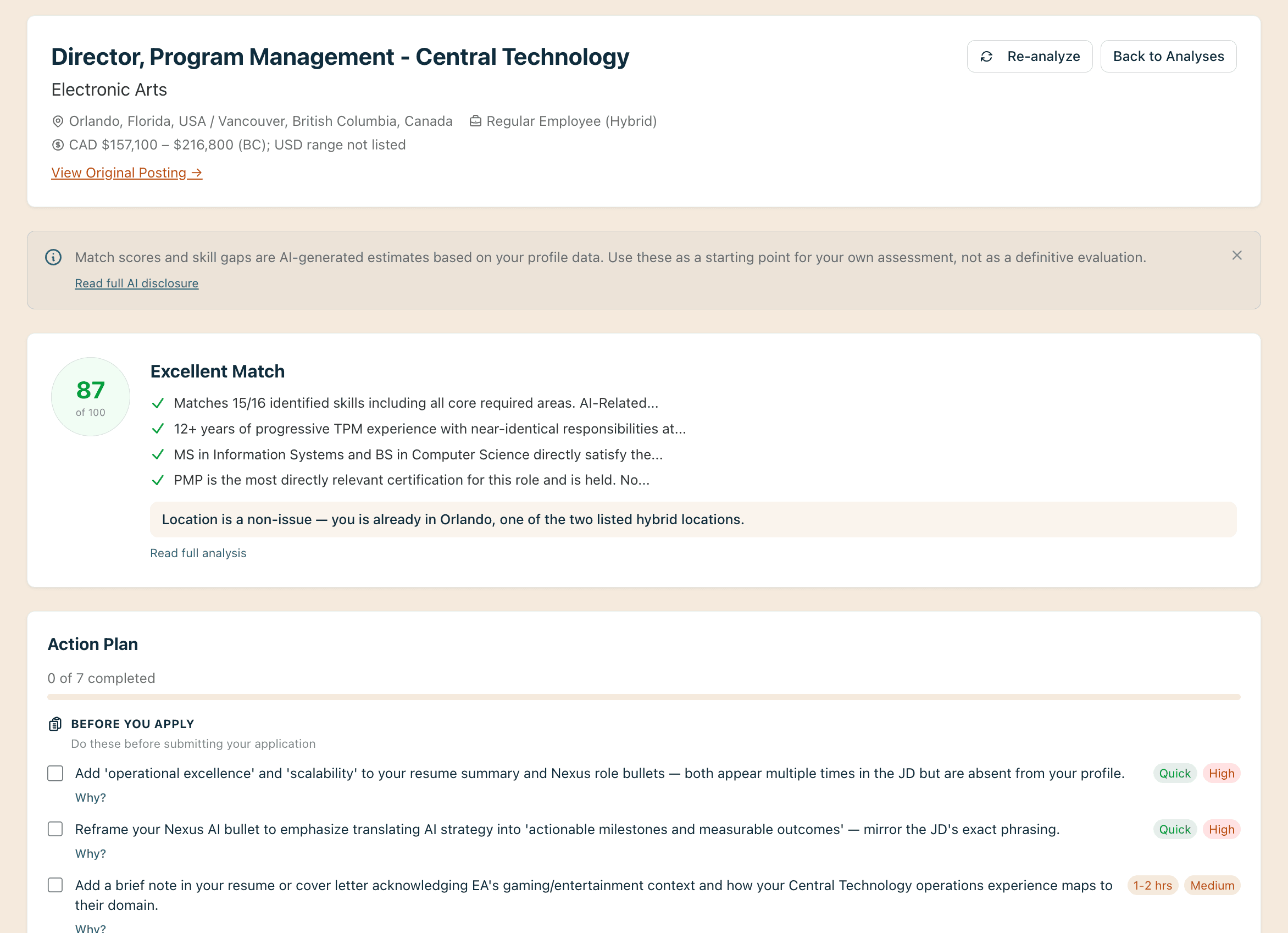
Structured scan showing skills, experience level, and requirements from any job description.
The Right Tool
Quick Check vs. Full Analysis: When to Use Each
Speed for screening. Depth for targeting.
The checker and the analyzer use the same AI engine, but they serve different moments in your job search. The checker is for early screening: you have a list of postings and need to narrow it down fast. The full analyzer is for when you have identified a specific role and want a comprehensive breakdown with match scoring, skill gap analysis, and action planning. Start with the checker to find the right roles, then switch to the analyzer for the ones you decide to pursue.
Next Steps
From Check to Action
Your scan is the starting point. Here’s how to act on it.
Check your resume against what the role requires with the Free Resume Audit
Generate a tailored resume for this specific role with the AI Resume Builder
Write a cover letter that addresses the key requirements with the AI Cover Letter Writer
Talk through your job search strategy with an AI career coach
Your Coach
A coach in your corner

A coach in your corner
Checking a lot of postings and not sure where to focus? Coach Campbell helps you turn quick scans into a focused job search strategy. He keeps you accountable and moving forward instead of endlessly browsing.
Related Tools
Explore More Job Search Tools
Common Questions
Frequently Asked Questions
Everything you need to know about checking job descriptions.
The checker scans for four things: the specific skills the role requires, the experience level it targets, the qualifications and certifications it expects, and the culture and work style it signals. You get a structured breakdown of each in under 15 seconds.
You can check them one at a time. Paste one posting, review the results, then paste another. Each check takes under 15 seconds so you can screen several postings in a few minutes. Create a free account to save your results and compare them side by side later.
Yes. Copy the full text from any job board, company career page, recruiter email, or internal posting and paste it in. The checker processes raw text, so it works regardless of where the posting was originally published.
Reading a posting tells you what it says. Checking it tells you what it means. The tool separates required qualifications from preferred ones, identifies the true seniority level (which often differs from the title), and surfaces culture signals that are easy to miss when skimming.
Similar, but faster and more focused. The checker is designed for quick screening when you are looking at multiple postings and need to decide which ones are worth your time. If you want a comprehensive deep-dive into a single posting, try the full job description analyzer.
No. Paste any job description and get results immediately without signing up. Your text is never stored. A free account lets you save your results, track applications, and generate tailored resumes and cover letters based on what the checker finds.
Check Any Job Description in Under 15 Seconds
Paste a job posting and get a structured scan of what the role actually requires. No account needed.